How to split a big task for an AI coding agent into smaller ones
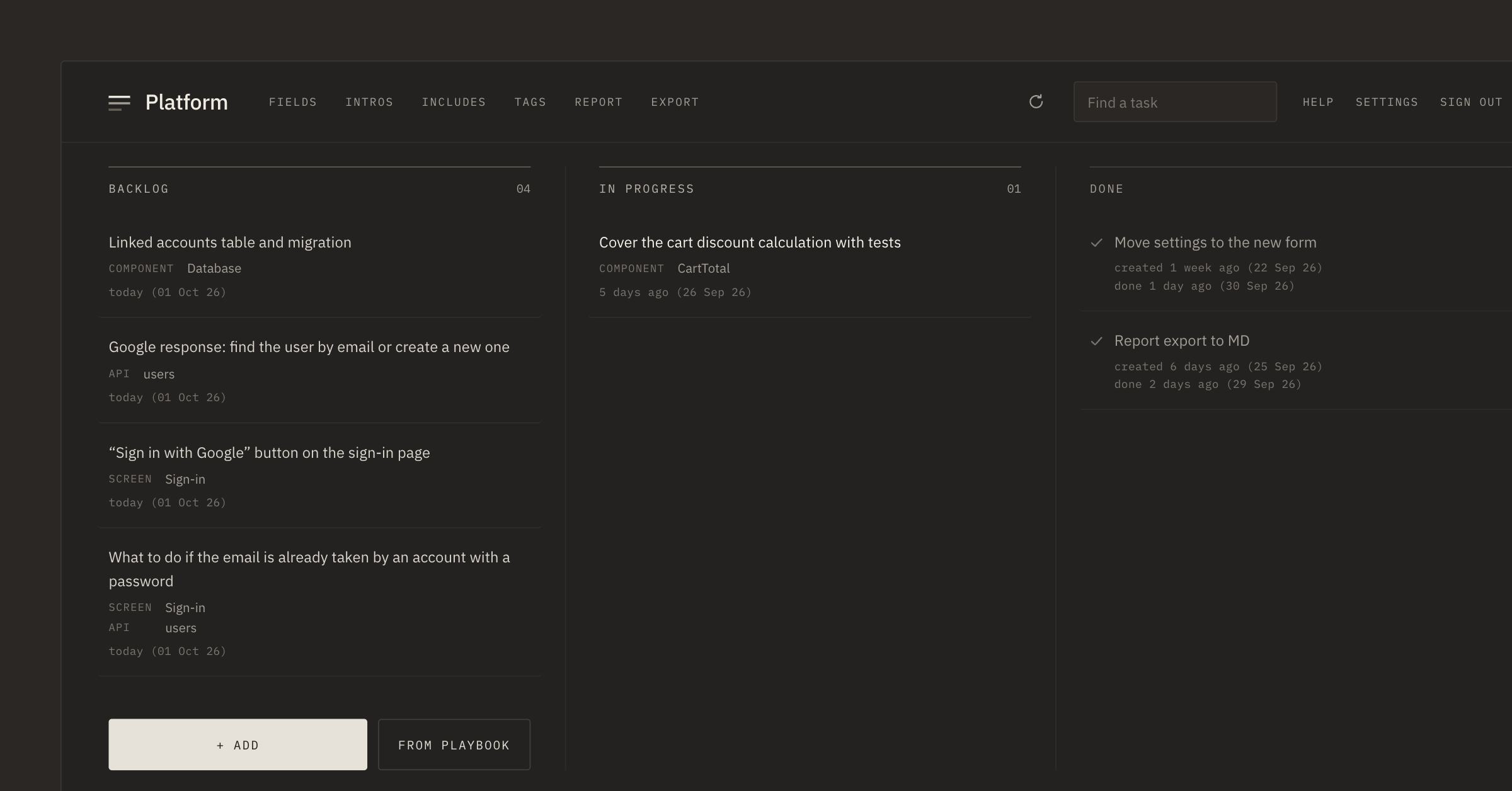
"Add sign-in with Google" sounds like one task. Until you start describing it: you need a table for linked accounts, handling of Google's response, a button on the sign-in page. And it's still unclear what to do if a user with a password already has that email.
Give the agent all of it at once, and it will do all of it at once. The result is a big diff that's hard to review. And if something went wrong at the second step, everything else is already built on top of it.
How to split
The main rule: every part can be checked on its own. For Google sign-in it might look like this:
- A table for linked accounts and a migration. Check: a migration test.
- Google's response: find the user by email or create a new one.
- A "Sign in with Google" button on the sign-in page.
- What to do if the email is already taken by an account with a password.
Order matters too: each part relies on what's already done and checked.
Parts in the backlog
Each item becomes a separate task in the backlog. In each one it's worth writing what should come out and picking fields: "Component: Database" for the first, "Screen: Sign-in" for the third. The project's includes go into every part on their own, so the rules don't have to be repeated four times.
An item without a decision yet is better not handed over. The fourth item on the list is a question, not a task: first you need to decide how to handle a taken email. Giving an agent a question instead of a task means getting its decision instead of yours. A task like that can sit at the bottom of the backlog until there's an answer.
The board sets the order: whatever is at the top of the backlog goes first. Drag it, and the order is set.
If the agent is connected over MCP, you can also ask it to split the task: it will write the parts into the backlog itself. The text and the order are still worth reading and adjusting.
One at a time or as a queue
When the next part depends on how the previous one turned out, it's easier to hand tasks over one at a time: "Copy and start", check the result, take the next one.
If the parts are clear and fully described, you can select them and hand them over together with "Copy for agent". With MCP the agent goes through them in order and marks each one done. More in the post "A queue for the agent that you set".
What it gives at review time
Three small changes are easier to review than one big one. If the second part came out wrong, only that part goes back for rework, and the first one is already done.
And you can stop between parts. Two tasks in "Done", two in the backlog, and tomorrow it's clear where to pick up.