Claude Code Rewind: How to Recover a Task That Went Off Track
If Claude Code did the wrong thing, you can roll its work back. The /rewind command returns files and the conversation to any of your prompts in the current session. But it doesn't roll back everything, and it's better to know that in advance.
Below is one example from start to finish: how to rewind, what to check in Git afterwards and what to add to the task so the agent doesn't go the same way on the next run. In Tascue that addition stays in the task itself, and the agent gets it on every later run.
The example
The agent was asked to add a status filter to the order list. It got it right the first time: it changed the code in the orders/ folder and added a test.
Then an old test failed. Asked to "fix the tests", the agent started changing the neighboring billing/ module, which has nothing to do with the filter. On top of that, it ran the ruff check --fix . autofixer across the whole repository.
The goal: keep the filter and undo everything the agent did after it.
Rewind in three steps
1. Open the list of prompts. Type /rewind or press Esc twice with an empty input. Claude Code saves the state before each of your prompts, so the list has two entries: "add the filter" and "fix the tests".
2. Pick the prompt and the action. You need the second prompt: everything before it was fine. There are several actions:
| Action | What comes back |
|---|---|
| Restore code and conversation | Files and conversation |
| Restore code | Files only |
| Restore conversation | Conversation only |
| Summarize from here | Nothing: the conversation from this point is compressed into a summary |
The first one fits here. Files go back to the state right after the filter. Everything the agent wrote about billing/ disappears from the conversation, and it won't build on it anymore.
3. Check what's left:
git status
git diff --stat
Why the third step matters
A checkpoint tracks only the edits Claude made with its file editing tools. Files changed only by Bash — through ruff check --fix ., sed or mv — won't come back. Neither will your manual edits or changes from other sessions. git status shows all of that, and only Git can restore it:
git restore billing/ shared/
The documentation says it plainly: checkpoints are "Not a replacement for version control". They're a quick undo within one session, and only the last 100 checkpoints are kept. It's safer to commit a good step right away, as soon as the filter works and the test passes. Then any next attempt starts from a point nothing can erase.
The line that stops the agent
Run the agent again as is, and it will head into billing/ again: the failing test hasn't gone anywhere. Before the run, add one line to the task:
Change only
orders/. If a test fails because of code in another module, stop and write which test and why — don't fix it.
It tells the agent where the boundary is and what to do when it hits it. The failing test in billing/ becomes a separate task, not a side effect of the filter.
What this task looks like in Tascue
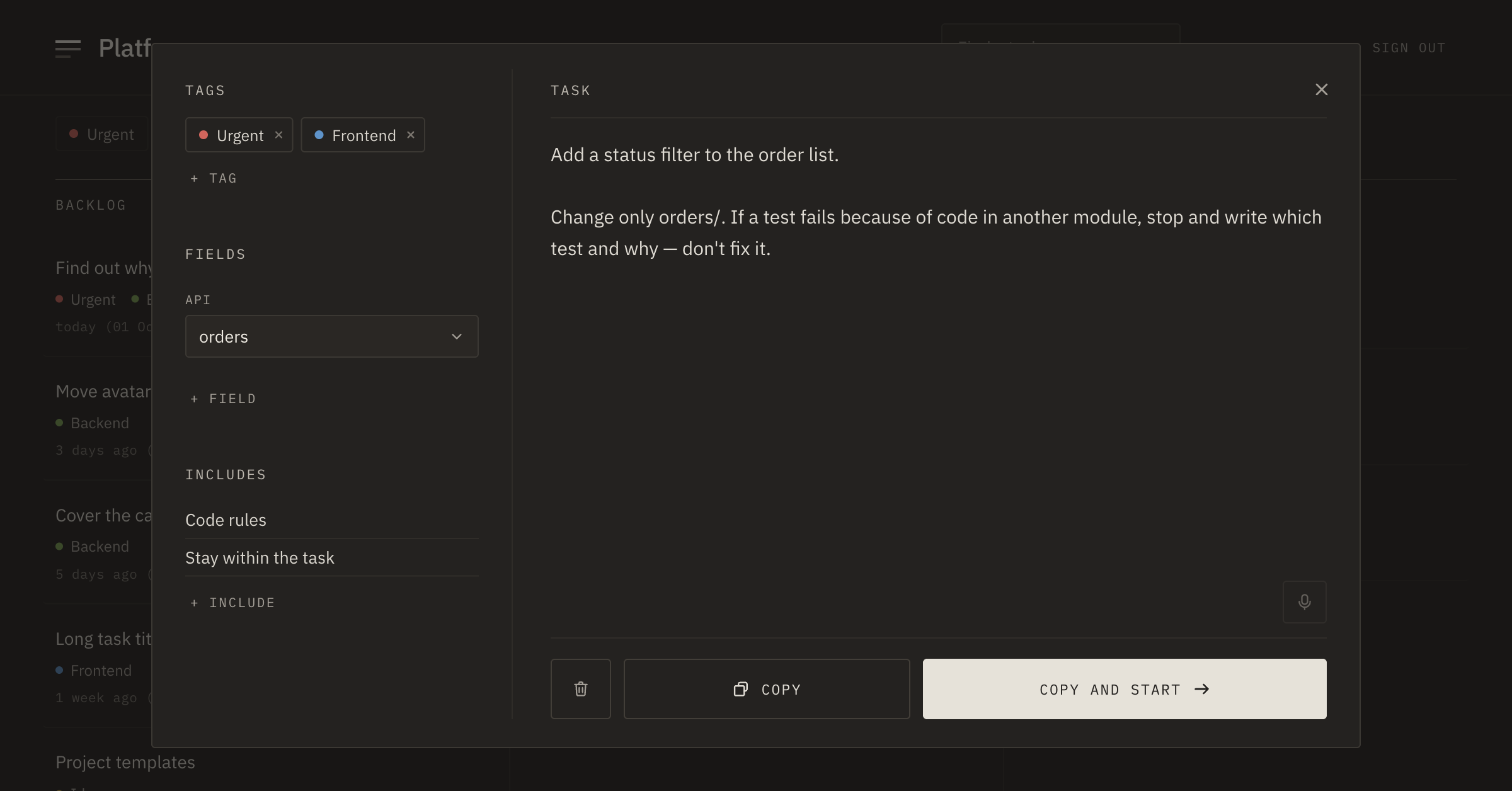
A rewind brings back files, but not what you figured out in the last half hour: where the agent should stop. That knowledge stays in your last message, and a new session won't have it. So in Tascue the boundary goes into the task itself:
Add a status filter to the order list.

Change only orders/. If a test fails because of code in another module,
stop and write which test and why — don't fix it.
You don't have to write the boundary in every task. If you need it often, make it a project include, for example "Stay within the task", and check it in tasks where the agent changes code. When you copy the task, the include goes to the end of the prompt.
The failing test in billing/ isn't lost either: it goes into the backlog as a separate task. You don't need to get distracted by it now, and in a day you can come back to it with a ready description.
The second run is the same Copy and start button: the prompt with the boundary goes to the clipboard, and the task moves to In progress. If the agent is connected over MCP, it takes the task and closes it itself. The rewind fixed one session, and the task with the boundary keeps the same mistake from happening in the next session or with another agent.