Claude Code Plan Mode: What to Check Before You Approve
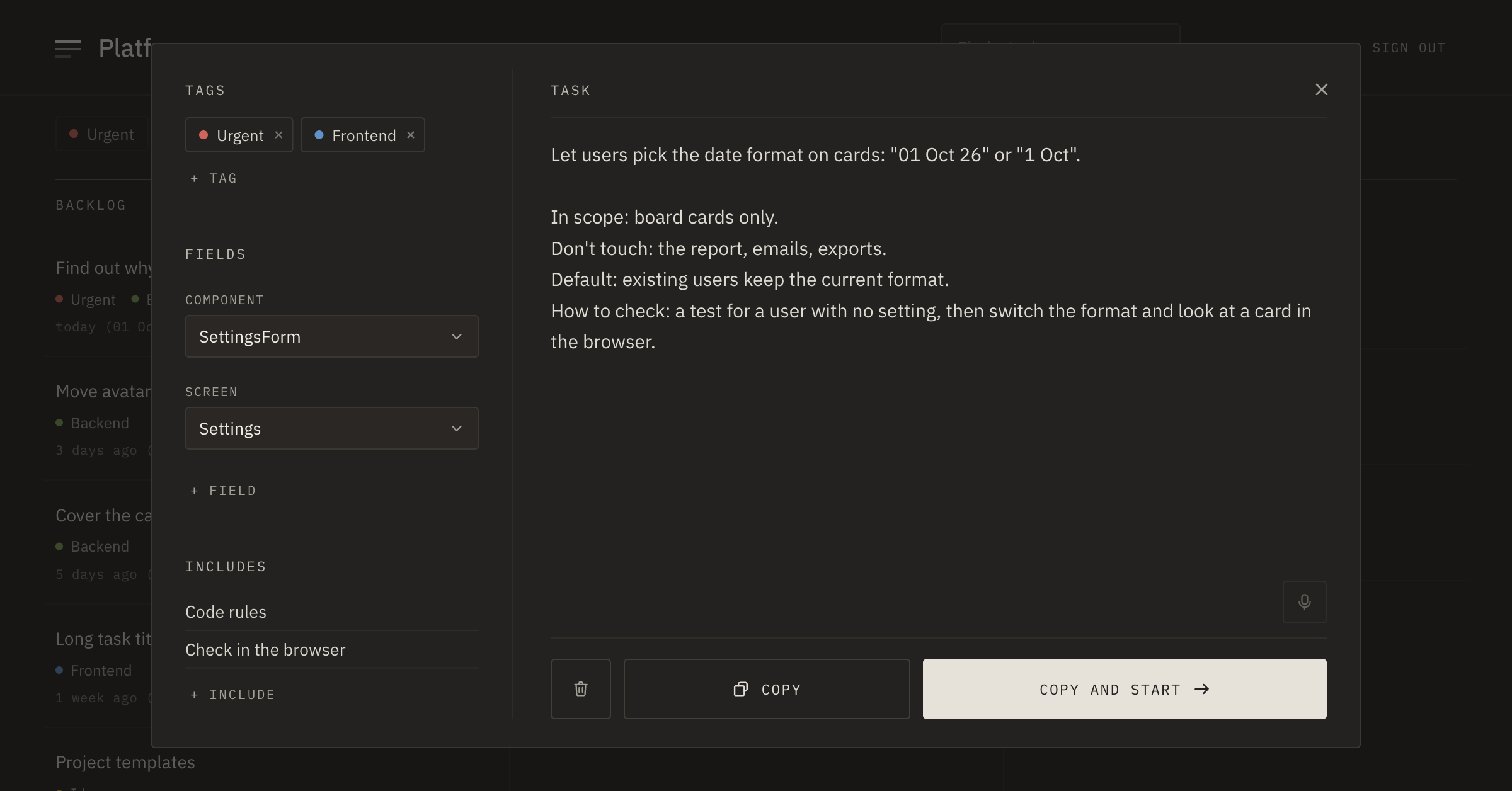
The task is small: let users pick the date format on cards. Right now it's always 01 Oct 26, and some people want 1 Oct. The agent sends a five-step plan, it looks sensible, and your hand reaches for "yes". Half an hour later it turns out the emails and the report export changed too, and every existing user now sees dates in the new format.
All of this was visible in the plan. You just need to know where to look, and then move the decisions you made into the task itself. In Tascue the task keeps them between sessions: the agent gets the same boundaries tomorrow and a week from now.
How to turn on plan mode
In a session, press Shift+Tab until ⏸ plan mode on shows at the bottom. Or start the session in this mode:
claude --permission-mode plan
In plan mode the agent reads the code and writes a plan but doesn't change files. When the plan is ready, Claude Code offers options: start working, start with manual approval of edits, or "No, keep planning" to stay in the plan and say what to change. Ctrl+G opens the plan in your editor so you can fix it by hand.
The plan before feedback
1. Add a date_format field to user settings.
2. Add a format picker on the Settings page.
3. Apply the format to cards, the report, emails and exports.
4. Add an "Auto" option: format based on the browser language.
5. Update the date formatting tests.
Read it with three questions.
What did the agent make up? The task didn't mention an "Auto" option. It looks handy, but it's new behavior: someone has to think it through, check it and maintain it.
Where did the task grow? The ask was cards. The agent added the report, emails and exports on its own, "for consistency". Maybe that's right, but it's a different task with a different risk.
What isn't checked? The plan says nothing about what users who never chose a format will see. There's no browser check either: "update the tests" is not the same as opening the board and looking.
The plan after feedback
The reply to "No, keep planning":
Board cards only. Don't touch the report, emails or exports. No "Auto" option. The default is the current format, so nothing changes for existing users. Check in the browser at the end.
1. Add a date_format field: "01 Oct 26" and "1 Oct", default "01 Oct 26".
2. Add a format picker on the Settings page.
3. Apply the format to board cards only.
4. Tests: a user with no setting keeps the old format; both formats on a card.
5. Open the board, switch the setting, reload the page and check a card.
The plan got shorter, and every step can be checked. It shows what stays the same and how to make sure everything works.
What should go into the task
The decisions you made while editing the plan live only in that session. If a new session picks up the task tomorrow, or the task comes back for rework, the agent starts from the original text and may suggest "Auto" and emails again.
So once the plan is agreed, write into the task:
- what's in: board cards only;
- what not to touch: the report, emails, exports;
- default behavior: existing users keep the current format;
- how to check: a test for a user with no setting and a browser check.
In Tascue that's four lines in the task text, and "check in the browser" can be attached as an include so you don't write it every time.
The plan is a draft, the task is the agreement
A plan quickly shows how the agent understood the task. But the expectations — what should come out, what not to touch and how to check — belong in the task itself, not in the conversation.
In Tascue a task with these expectations sits in the backlog until you get to it. You can hand it to an agent today or next week, in a new session or over MCP. Each time the agent gets the same text and the same boundaries. The next plan for it reads faster: most of the questions are already settled in the task.